Thursday, August 4, 2011

Understanding Nikon’s Three Light Metering Systems


The basis for a Nikon DSLR’s exposure meter is an RGB sensor that meters a wide area of the frame. When used with a G or D Nikkor CPU lens, the camera can set exposure based on the distribution of brightness, color, distance, and composition. Most people leave their cameras set to Matrix metering and enjoy excellent results. Others use the Center-weighted meter, or the Spot meter. Let's look more closely at each of the Nikon exposure meters.


3D Color Matrix II Meter

Nikons use a 3D Color Matrix II metering system that is one of the most powerful and accurate automatic exposure meters in any camera today. It uses the symbol shown in Figure 1. Look in your manual to see how to set the camera to Matrix metering. This is the default setting from the factory.

Figure 1 – Matrix metering symbol in a D300S Control Panel. This symbol will also be found on the monitor when you press the Info button and look for the metering symbol.


There are characteristics for many thousands of images stored in the camera. These characteristics are used—along with proprietary Nikon software and complex evaluative computations—to analyze the image that appears in your Viewfinder. The meter is then set to provide very accurate exposures for the majority of your images.

A simple example of this might be a picture where the horizon runs through the middle of the image. The sky above is bright and the earth below is much dimmer. By evaluating this image and comparing it to hundreds of similar images in the camera's database, an exposure setting is automatically input for you.

The Matrix meter examines four critical areas of each picture. It compares the levels of brightness in various parts of the scene to determine the total range of exposure values. It then notices the color of the subject and its surroundings. If you are using a G or D CPU lens, it also determines how far away your lens is focused so that it can figure the distance to your subject. Finally, it looks at the compositional elements of the subject.

Once it has all that information, it compares your image to tens of thousands of image characteristics in its image database, makes complex evaluations, and comes up with a meter value that is usually right on the money, even in complex lighting situations.


Center-Weighted Meter

If you were raised on a classic center-weighted meter and still prefer that type, your Nikon's exposure meter can be transformed into a flexible center-weighted meter with a variable-sized weighting that you can control. Examine the user's manual for instructions on setting the camera to Center-weighted metering.

Figure 2 – Center-weighted metering symbol in a D300S Control Panel. Look for this symbol on the monitor too, when you have selected Center-weighted metering.

The Center-weighted meter examines the entire frame, but concentrates most of the metering in an small circle in the middle of the frame. If you'd like, you can make the circle as small as 6mm or as large as 13mm (may vary with some Nikons). Let’s examine the Center-weighted meter more closely.

Using the Custom setting b Metering/exposure called something similar to Center-weighted area, you can change the size of the circle where the camera concentrates the meter reading. If you'd like, you can even completely eliminate the circle and use the entire Viewfinder frame as a basic averaging meter.

As mentioned previously, the circle in your Viewfinder is normally 8mm. However, by using the Custom setting b - Center-weighted area, you can adjust this size to one of the following (may vary with different Nikons):

  • 6mm (.24 inch) 
  • 8mm (.32 inch)
  • 10mm (.39 inch)
  • 13mm (.51 inch)
  • Avg – Entire Frame

The Center-weighted meter is a pretty simple concept. The part of your subject that's in the center of your camera's Viewfinder influences the meter more than the parts closer to the edges of the frame.

Where's the Circle?

You can't see any indication of a circle in the Viewfinder, so you'll have to imagine one.

Figure 3 – Series of imaginary red circles in the viewfinder and averaging full frame 

Here's how (see figure 3): Locate your current AF point in the middle of your Viewfinder. The length of the little rectangle you see is about 2 or 3mm (.10–.12 inch) in size. If you imagine about three of these little rectangles side-by-side, that's about the same size as the default 8mm circle, which at .32 inches is about 1/3 of an inch. The 13mm maximum size circle, at .51 inches, is about 1/2 inch wide.

Primarily, just remember that the center area of the Viewfinder provides the most important metering area and you'll do fine. For information on fine-tuning Center-weighted metering, refer to the section titled “Fine Tune Optimal Exposure – Custom Setting b6” in chapter 4, Custom Setting Menu.

What about the Averaging Meter?

If you set your meter to Avg in Custom setting b Metering/exposure > Center-weighted area (full averaging), the light values of the entire Viewfinder are averaged to arrive at an exposure value. No particular area of the frame is assigned any greater importance (figure 3, image 5).

This is a little bit like Matrix metering, but without the extra smarts. In fact, on several test subjects, I got remarkably similar meter readings from Avg and Matrix. Matrix should do better in difficult lighting situations, since it has a database of image characteristics to compare with your current image, and it looks at color, distance, and where your subject is located in the frame.


Spot Meter

Sometimes no other meter but a spot meter will do. In situations where you must get an accurate exposure for a very small section of the frame, or must get several meter readings from different small areas, the camera can, once again, be adjusted to fit your needs. Look into the user's manual for instructions on setting the camera to Spot metering.

Figure 4A – Spot metering symbol in a D300S Control Panel. Also check the monitor after setting the camera to Spot metering mode.

The Spot meter consists of a 3mm circle surrounding the currently active AF point (figure 4B). The Spot meter evaluates only 2 or 3 percent of the frame, so it is indeed a "spot" meter. Since the spot surrounds the currently active AF point, you can move the Spot meter around the Viewfinder within the AF points in your camera’s viewfinder.

FIG 4B – Viewfinder view of the 3mm spot in a Nikon D300S
How big is the 2 or 3mm spot? Well, the Spot meter barely surrounds the little AF point rectangle in your Viewfinder. It is rather small! When your camera is in Spot meter mode, and you move the AF point to some small section of your subject, you can rest assured that you're getting a true spot reading.

In fact, you can use your Spot meter to determine an approximate range of light values in the entire image. You can do this by metering the lightest spot in the frame and the darkest spot. If this value exceeds 5 or 6 stops difference in light level, you've got to decide which part of your subject is most important to you and meter only for that part. Something is going to blow out.

On an overcast day, you can usually get by with no compensation since the range of light values is often within the recording capability of the sensor. On a bright sunny day, the range of light exceeds what your sensor can record by as much as two times. This range can often be as large as 12 stops total, while your sensor can only record a maximum of 6 or 7 stops!

Don't let the numbers make you nervous. Just remember that spot metering is often a trade-off. You trade the ability of the camera's multiple "averaging" skills to generally get the correct exposure throughout the frame, for the highly specific ability to ensure a certain portion of an image is "spot-on". The choice is yours, depending on the shooting situation.

If you spot-meter the face of a person standing in the sun, the shadows around that person will contain little or no data. The shadows will often come out as solid black in the final image. If you spot-meter for the shadows instead, the person's face is likely to blow out to solid white. We'll discuss this in more detail in a later section of this chapter when we explore the Histogram.

Use your Spot meter to get specific meter readings of small areas on and around your subject, make some exposure decisions yourself, and your subject should be well exposed. Just remember that the Spot meter evaluates only for the small area that it sees, so it cannot adjust the camera for anything except that one tiny area. Spot metering requires some practice to learn how to use it well, but it is a very powerful tool to balance exposure values in your images.


My Conclusions

Most people use Matrix metering most of the time. In my experience, few people use the Center-weighted meter. However, for those raised on that type of meter, Nikon gives you a choice. Spot metering is very useful to take careful control of the exposure when you need detailed control.

Learn to use all three meter types and you can make an intelligent choice when the time comes to change to a different style of meter.

Keep on capturing time…
Darrell Young

Tuesday, August 2, 2011

Selecting a Nikon Speedlight Flash Unit


Nikon makes several Speedlight units that work very well with your Nikon DSLR camera. I have used the SB-400, SB-600, SB-700, SB-800, and SB-900 Speedlights extensively. There are also the R1C1 flash units (SB-R200), which are designed to be used in small groups, such as for a ring-light arrangement.

Let’s consider each of the current Nikon Speedlights, along with basic information on the unit’s guide number, lens coverage, and how to view detailed specification information on Nikon’s website.


Nikon SB-900 Speedlight

I really enjoy using the Nikon SB-900 Speedlight unit. It is very powerful and easy to use in the CLS arrangement because it has external controls for setting remote mode. It can also be used as a CLS commander when needed.

The SB-900 is now Nikon’s flagship Speedlight. It has adjustable beam width that goes wider and farther than most of the flash units. It has a big, detachable diffuser that really helps control hotspots and contrast. Plus, it has an included filter system that communicates with the flash unit.

The Nikon SB-900 Speedlight – Nikon's Flagship Flash Unit
The controls and menus on the SB-900 are very easy to use; much easier than the previous flagship flash, the SB-800. One perceived drawback: The SB-900 unit is such a powerhouse that it can overheat if fired rapidly, caused by allowing the batteries to get hot from heavy current drain. For that reason it has a built-in temperature sensor that will prevent the flash from being fired when it gets too hot. This sensor can be enabled/disabled in the camera’s menu. Many photographers leave it disabled so that the flash will not shut off when hot. That could be a problem in events like a wedding. Of course, if you shoot so hard and fast that your flash unit bursts into flames, I suspect that the warranty will be void!

So far, my use of the flash has not caused it to get too hot, and I’ve shot all sorts of events, so this may not be a real problem for most. There is a firmware upgrade that addresses this issue to some degree. However, some have chosen to seek out the older flagship SB-800, which does not suffer from this percieved issue.

I have both flash units and like them both very well. I use the SB-900 now more than the SB-800 because I love the extra reach the narrow beam width gives me, and I shoot a lot of wide angle group shots. The extra-wide zoom position the SB-900 provides really makes a difference. Plus, I love that big white diffuser!

Official SB-900 Guide Number Information

  • 34m/111.5ft. (at ISO 100, 35mm zoom head position, in FX format, standard illumination pattern, 20°C/68°F) to 48m/157.5ft. (at ISO 200, 35mm zoom head position, in FX format, standard illumination pattern, 20°C/68°F)

Official SB-900 Lens Coverage

  • 17 to 200mm (FX-format, Automatic mode) 
  • 12 to 200mm (DX-format, Automatic mode) 
  • 12 to 17mm (FX-format, Automatic mode with built-in wide-angle panel deployed) 
  • 8 to 11mm (DX-format, Automatic mode with built-in wide-angle panel deployed)

Built-in Wireless Commander Mode for Nikon CLS 

  • Wireless Commander Mode offers wireless control at the master Speedlight position, controlling up to 3 remote Speedlight groups and an unlimited number of compatible Speedlights. 
  • Four wireless channel options help manage wireless conflicts in multi-photographer environments.

Nikon Official SB-900 Website Address
http://www.nikonusa.com/Nikon-Products/Product/Flashes/4807/SB-900-AF-Speedlight.html


Nikon SB-800 Speedlight

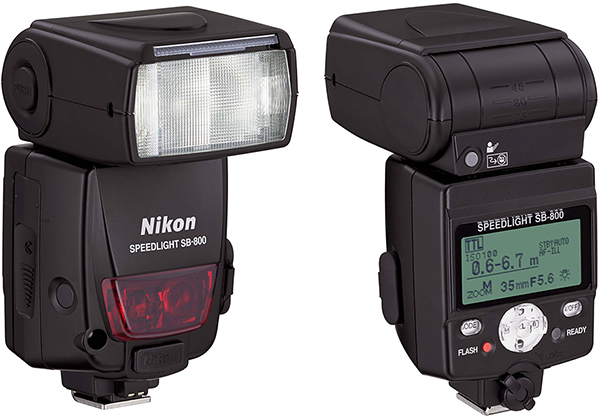
The SB-800 Speedlight unit is similar in power to the SB-900 and has the ability to be a CLS commander too. The SB-800’s controls are more difficult to adjust than the SB-900’s controls because the settings are buried in menus. I’ve used these successfully for several years.

The SB-800 Speedlight – Nikon's Previous Flagship Flash Unit
The SB-800 is out of production but still in very high demand due to the perceived heating issue with the SB-900. You can sometimes buy them as new old stock on Amazon.com or eBay, but be prepared to pay a large amount of money. As this book was going to print, I saw a new old stock SB-800 on Amazon.com for over $850. Will the SB-700 or SB-900 replace the desire many have for the SB-800?  Time will tell!

Official SB-800 Guide Number Information

  • 38m/125ft. (at ISO 100, 35mm zoom-head position, 20°C/68°F) to 53m/174ft. (at ISO 100 and 105mm zoom-head position, 20°C/68°F)

Official SB-800 Lens Coverage

  • 24 to 105mm (Automatic mode)
  • 14 to 17mm (Automatic mode, with built-in wide flash adapter (14mm with SW-10H Diffusion Dome)

Built-in Wireless Commander Mode for Nikon CLS 

  • Control as many as 3 remote groups (A, B and C) of an unlimited number of compatible Speedlights with the SB-800's wireless Commander mode.

Nikon Official SB-800 Website Address
http://www.nikonusa.com/Nikon-Products/Product-Archive/Flashes/4801/SB-800-AF-Speedlight-.html


Nikon SB-700 Speedlight

The SB-700 is one of Nikon’s latest Speedlight units, having been released after the SB-900. It seems destined to replace the lower-cost SB-600. It has a built-in wireless commander mode, allowing it to be a controller in the Nikon Creative Lighting System (CLS).

The SB-700 Speedlight
The unit has a nice zoom range on its flash head, reaching out to the coverage of a 120mm lens. It also covers the wide end well, with the equivalent coverage of a 14mm in DX format, and a 24mm in FX. It’s quite a desirable flash unit for its power level and lower cost over the SB-900. The external controls on the flash make it significantly easier to use than its cousin the SB-600, which has many functions buried in menus.  Consider this flash if you are on a budget, yet need excellent power and coverage.

Official SB-700 Guide Number Information

  • 28m/92ft. (at ISO 100, 35mm zoom head position, in FX format, standard illumination pattern, 20°C/68°F) to 39m/128ft. (at ISO 200, 35mm zoom head position, in FX format, standard illumination pattern, 20°C/68°F)

Official SB-700 Lens Coverage

  • 24 to 120mm (FX-Format)
  • 14-120mm (DX-format)

Built-in Wireless Commander Mode for Nikon CLS 

  • Wireless Commander Mode controls up to 2 remote Speedlight groups and an unlimited number of compatible Speedlights. When used as a remote speedlight up to 3 Groups can be selected. 
  • Four wireless channel options help manage wireless conflicts in multi-photographer environments.

Nikon Official SB-700 Website Address
http://www.nikonusa.com/Nikon-Products/Product/Flashes/4808/SB-700-AF-Speedlight.html


Nikon SB-600 Speedlight

The Nikon SB-600 Speedlight unit is the low-cost flash for users on a budget. It is only about one stop less powerful than the SB-900 or SB-800 unit and costs considerably less.

The Nikon SB-600 Speedlight
Buying several of these won’t set you back much and will allow you to set up a great CLS system with your D7000. If you are just getting started in CLS, these might be your best investment. The SB-600 does not have a built-in Commander mode itself, like the SB-700, SB-800, and SB-900, but you don’t need it since your D7000 does.

Hurry though, if you plan to buy one or more SB-600 units; the SB-600 will probably be phased out now that the SB-700 is on the market.

Official SB-600 Guide Number Information

  • 30m/98ft. (at ISO 100, 35mm zoom-head position, 20°C/68°F) to 42m/138ft. (at ISO 200, 35mm zoom-head position, at 20°C/68°F)

Official SB-600 Lens Coverage

  • 24 to 85mm (Automatic mode)
  • 14mm to 85mm (Manual Mode, with built-in wide-flash adapter)
  • 24mm to 85mm (Manual Mode)

Built-in Wireless Commander Mode for Nikon CLS 

  • None – but does have a remote (slave) mode for use in groups under Nikon CLS control.

Nikon Official SB-600 Website Address
http://www.nikonusa.com/Nikon-Products/Product/Flashes/4802/SB-600-AF-Speedlight.html


Nikon SB-400 Speedlight

The SB-400 is Nikon’s answer to those who need an economical—yet quite powerful—stand-alone flash unit.  Its small size belies its impressive reach and power.  I often use my Nikon D7000 as a backup camera during event shooting. I find that this little SB-400 and the D7000’s AUTO exposure mode will give me excellent images without thinking about exposure. What else can one ask from a camera/flash combo in fast shooting conditions?

The Nikon SB-400 Speedlight
I’ve shot several weddings with the SB-400 on the D7000, as a backup camera and flash combo, and this little baby is a firecracker. Why buy some aftermarket flash unit, when you can own a genuine Nikon for about US$120. While not a contender for using within the Nikon CLS system, due to its lack of CLS compatibility, the SB-400 is a great standalone flash with plenty of power for a reasonable price!

Official SB-400 Guide Number Information

  • 21m/69ft. (at ISO 100, 18mm zoom-head position, 20°C/68°F) to 30m/98.4ft. (at ISO 200, 18mm zoom-head position, 20°C/68°F)

Official SB-400 Lens Coverage

  • As wide as 18mm on Nikon DX-format digital SLR cameras and 27mm on FX format.

Built-in Wireless Commander Mode for Nikon CLS 

  • None (no remote mode either). This is a stand-alone flash unit not to be used in groups.

Nikon Official SB-400 Website Address
http://www.nikonusa.com/Nikon-Products/Product/Flashes/4806/SB-400-Speedlight-Unit.html


Nikon SB-R200 Speedlight

Then there are the SB-R200 Speedlight units. These are primarily designed to use in special arrangements on brackets that Nikon created for them. These flash units are not really designed for use in a camera’s Accessory shoe. Instead, they have a special foot made to mount to special brackets, as shown in the picture of the Nikon D7000 with the SX-1 circular bracket mounted to the lens’s front with two SB-R200 flashes.

The Nikon SB-R200 Speedlight and D7000 with the SX-1 ring bracket
You’ll see these Speedlights in use if you watch many crime dramas on TV because the investigators often use them for close-up flashes of crime scene evidence. They are normally used in a group arrangement, including special mounting brackets, with a Nikon SU-800 Wireless Speedlight Commander Unit. The SU-800 is discussed next.

Official SB-R200 Guide Number Information

  • 10m/33ft. (at ISO 100) to 14m/46ft. (at ISO 200)

Official SB-R200 Lens Coverage

  • 24mm; 60° (vertical) and 78° (horizontal)

Built-in Wireless Commander Mode for Nikon CLS 

  • None – but does have a remote (slave) mode for use in groups under Nikon CLS control.

Nikon Official SB-R200 Website Address
http://www.nikonusa.com/Nikon-Products/Product/Flashes/4805/SB-R200-Wireless-Speedlight.html


Nikon SU-800 Wireless Commander Unit

While not a Speedlight flash, I wanted to show you the Nikon SU-800 Wireless Speedlight Commander Unit (see figure 4E). This unit can be used when you need extra range or need to control more than two banks of flash units—it can control three.  The SU-800 can control slave flash units up to 66 feet away, where most Speedlights with a Commander mode can only control out to 33 feet.

The Nikon SU-800 Wireless Commander Unit
It uses wireless infrared signals to control the flash banks. It is mounted onto the Accessory shoe of your camera, thereby precluding the use of the built-in flash.

Official Nikon Key Features

  • Functions as a wireless commander for the SB-R200, SB-900, SB-800, SB-700 and SB-600 Speedlight units.
  • Controls an unlimited number of Speedlights for up to three groups.
  • Provides wireless control up to 66 feet.
  • Offers 4 independent channels for competitive shooting environments.
  • Built-in AF assists illuminator for critical focus in low-light situations.

Nikon Official SU-800 Website Address
http://www.nikonusa.com/Nikon-Products/Product/Flashes/4794/SU-800-Wireless-Speedlight-Commander.html

Keep on capturing time...
Darrell Young

Saturday, July 30, 2011

Nikon Camera Totin' Skeeters

Did I tell you about the mosquito ("skeeter") in Great Smoky Mountains National Park that was soooo big that it tried to take my Nikon D7000 away from me? I'm still shaking when I think about it. I've not even been able to take any good handheld pictures since then. I'm too shaky from remembering the incident.

I found out later that there is a species of mosquito in the Smokies that basically collects cameras. A ranger found quite a cache of Nikons in a hollow tree the other day. They're auctioning them off to benefit Great Smoky Mountains National Park. There were no other brands of camera found besides Nikon. At least they have good taste.

A .45 caliber pistol is the only effective repellent for these dudes. Even Smoky Bear runs from them. You may have seen some of them in the movie Jumanji; you remember, the one with Robin Williams and the weird game. They had captured a couple dozen of them for the movie and trained them. It didn't work out so well, though, 'cause the skeeters stole a car and went on a wild rampage, smashing buildings, other cars, houses, and such. In fact, some of the wreckage in the movie Jumanji was real. They said, what the heck, we might as well film what the skeeters did, since we'll have to pay for it anyway.

Be very careful in the Smokies if you are carrying a Nikon, especially digital. They seem extra interested in the digitals. Maybe it's the EM radiation from the CMOS and CCD imaging sensor chips. And, no matter what, don't come wearing any concoction containing DEET (skeeter nerve agent found in many repellent sprays). These skeeters drink the stuff like soda pop and are quite addicted to it. They'll break your car window to get to the bottle of skeeter repellent.

They seem to hang out around the Tremont area and the middle prong of the Little Pigeon River. Now that I think about it, I haven't seen many of the little pigeons around the river these days!

Keep on capturing time...
Darrell Young

Friday, July 29, 2011

Photography Basics - Understanding Stops, F/Stops, and EV Steps

This article is an excerpt from my upcoming book, Moving Beyond Point-and-Shoot Photography, The Next Step: Learning to Use a DSLR or Interchangeable Lens Camera by Darrell Young. This book aims to teach new DSLR or ILC camera users how to use their more powerful cameras in a superior fashion and assumes no previous knowledge of any aspect of photography. Look for it in March 2012.

What is a Stop?


The term stop is used in photography to represent a relative change in the amount of light that is allowed into the camera.


If you double the light getting into the camera with any of the exposure controls, you have increased the light by one stop. If you reduce the light by half with any of the controls, you have reduced the light by one stop.


What tends to confuse many at first is that the word stop is often used when referring to three different exposure controls: ISO sensitivity, aperture, and shutter speed. Why? Because all three can manage the light that creates the picture. In other words, all three exposure controls allow more or less light into the camera. Adjusting these controls is referred to as “stopping down” (allowing less light let in) or “stopping up” (allowing more light in).


This is an important word to photographers because it gives us an easy way to describe either letting twice as much or half as much light into the camera. One stop up lets in twice as much light, one stop down lets in half as much light.


The phrase stopping down is used much more often in photography writing than the term stopping up. For whatever reason, you’ll more often hear stopping up called opening up instead. The term stop originated in the use of the aperture, but eventually came to mean letting in more or less light.


However you hear or read it, just remember that changing a setting by one stop up (opening or stopping up) lets in twice as much light; changing by one stop down (stopping down) lets in half as much light.


When you read something like, “Let in an extra stop of light,” that simply means doubling the light. If you read, “Take away a stop of light,” it means, cut the light in half. Basically, the term “stop” is a shortcut way of saying “twice as much,” or “half as much” light volume.


If these last few paragraphs seem repetitive, it was on purpose. This is a very important phrase for you to understand!


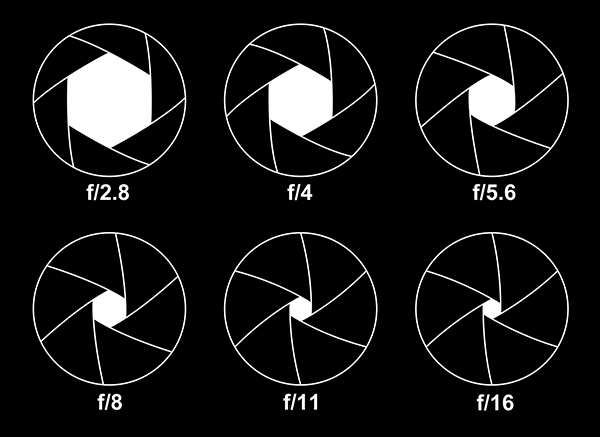
F/Stops or stops running from f/2.8 to f/16, in this case managed by the aperture control. Each step down cuts light in half, while each step up doubles the light into the camera. The aperture controls how much light comes into the camera, while the shutter speed controls how long light comes into the camera. The ISO sensitivity setting controls how sensitive to light your camera's imaging sensor is. Those three controls are the backbone of controlling exposure. My upcoming  book explains how to use them all together, in an understandable way.

What is an F/Stop?


There is a similar term used in photography that is related directly to how a lens works: the f/stop. This is the origin of the term stop, which is just a shortened form of f/stop. The word stop can have meaning for any of the controls, where f/stop is limited to the aperture control.


Basically, f/stop means the same thing as the word stop, except that it is related to the physical aperture control on your camera. You could interchange the words f/stop or stop when talking about controlling the light with your camera’s aperture. Saying, “Open up one stop” means the same thing as “Open up one f/stop”—let in twice as much light, and vice versa. So when you read the word f/stop, just remember it means the same thing as stop, except it is directly related to the aperture control of the camera, not the shutter speed or ISO sensitivity.


The word f/stop comes from the good old days of having f/numbers (aperture numbers) on a ring at the back of a lens (e.g., f/3.5, f/5.6, f/8). When you turned the aperture ring in one direction you would let in more light, or in the other direction, less light. Most new cameras control the f/stops with a dial you turn on the camera’s body.

What is an EV Step?

Most camera users manuals will also call a stop by yet another name called EV step. EV stands for exposure value, and an EV step is a doubling or halving of light or the equivalent of one stop. 


Whenever you see the words stop, f/stop, or EV step, just realize that they all basically mean the same thing, a doubling or halving of the amount of light getting into the camera. 

Keep on capturing time...
Darrell Young

Wednesday, July 27, 2011

Nikon AF-S Micro Nikkor 40mm f/2.8G Lens for DX – Mini Review


On July 12, 2011 Nikon released a brand new macro lens for DX (only) users. It is an affordable lens, with a suggested retail price of US$279.00. Of course, street prices will often be lower than suggested retail.

 Nikon's AF-S Micro Nikkor 40mm f/2.8G Lens

The AF-S Micro Nikkor 40mm is a small-sized lens with a nice fast aperture and a slightly wide angle view on DX cameras like the Nikon D7000, D300S, D90, D5100, D5000, D3100, and D3000. In fact, since it is an AF-S lens (silent wave motor) with built-in autofocus it will work with all the smaller Nikon cameras like the D3100 and D5100, which have no autofocus motor and depend on the lens to autofocus.

It is able to do 1:1 reproduction without any attachments, which means that you can take high quality stills and close up movies at life-size ratios. If you would like to shoot extreme close ups of things like flowers and collectibles like coins and stamps, this lens is perfect. It has continuous auto or manual focus from 6.4 inches to infinity. At its closest setting it is shooting at a 1X or 1:1 (life-size) ratio. It can also be used for copying old photographs because of its flat-field design (low distortion).

Nikon even recommends the lens for portraits and landscapes. With the large available aperture you have the ability to blur the background for those isolated-subject  shots that are so appealing to us all. The lens has a “rounded” seven-bladed aperture, so it should produce natural-looking bokeh (blurred highlights). In fact, you could even carry the lens as a normal everyday lens for that extreme sharpness and beautiful depth of field only available from the best prime (single focal length) lenses. Since it is a normal lens, it sees approximately what the human eye considers normally-sized subjects on a DX camera.

Here are some of its detailed features:
  • CRC, or Close Range Focusing – The lens uses a floating element design, allowing each lens group to move independently, achieving superior performance when shooting at macro (up close) distances.

  • SWM, or Silent Wave Motor – The lens uses inaudible ultrasonic vibrations to autofocus the lens—providing very smooth and quiet, yet precise, autofocus.

  • SIC, or Super Integrated Coating – The coating on the lens reduces flare and ghosting, helps keeps color consistent, and enhances light transmission.

  • M/A, or Manual/Auto switch – With a macro lens it is very important to have manual focusing ability. Often when focusing at micro distances the depth of field will be so shallow that the focus can only cover a few millimeters of the subject. In extreme close up shooting you may want to use manual focus. All you have to do is flip the M/A switch to M and the lens is ready for your manual focusing. Flip it back to A and autofocus is re-enabled.

Here are the technical specs on the lens:
  • Mount Type :   Nikon F-Bayonet
  • Focal Length : 40mm
  • Maximum Aperture:  f/2.8 
  • Minimum Aperture: f/22 
  • Format: DX 
  • Maximum Angle of View (DX-format): 38°50'
  • Maximum Reproduction Ratio: 1.0x 
  • Lens Elements : 9 
  • Lens Groups: 7 
  • Compatible Format(s) : DX 
  • Diaphragm Blades: 7 
  • Distance Information: Yes 
  • Super Integrated Coating: Yes 
  • Autofocus: Yes 
  • AF-S (Silent Wave Motor): Yes 
  • Minimum Focus Distance: .53ft.(0.163m) 
  • Focus Modes: Auto, Manual, and Manual/Auto 
  • G-type: Yes 
  • Filter Size: 52mm 
  • Accepts Filter Type: Screw-on 
  • Dimensions: (Approx.)2.7x2.5 in. (Diameter x Length), 68.5x64.5mm (Diameter x Length) 
  • Weight: (Approx.)9.9 oz. (280g) 
  • Supplied Accessories: LC-52 52mm Snap-on Front Lens Cap, LF-4 Rear Lens Cap, HB-61 Bayonet Hood, CL-0915 Flexible Lens Pouch

This lens seems to be the answer for those among us who like a small, very portable macro lens. Since it can be used as a normal lens, constantly on the camera instead of a zoom lens, it is certainly good for students of photography that want to make great portraits, landscapes, and close up images with one low-cost, yet high-quality lens.

If you are on a budget, but want superior macro and normal photography, get yourself an AF-S Micro Nikkor 40mm f/2.8G lens.

Keep on capturing time...
Darrell Young

Friday, July 22, 2011

A Visit to Greenbrier in the Smoky Mountains

I have a great fondness for taking pictures in the Smoky Mountains. As far back as I can remember I've been running around the Smokies with my Nikon camera and tripod. Recently, I set out to find a place in the Smokies that I'd never seen. One place that was new to me is Greenbrier, near Gatlinburg.

I've seen all the standard Smoky Mountain sights like Cades Cove and Tremont, and have thousands of pictures to prove it. In the last year or two I've been leaving the Smokies to photograph other areas like the Blue Ridge Parkway and Cherohala Skyway. I took a lot of great pictures in those places but soon felt a hankering to return to "my" mountains, the Great Smokies.

Attached Image


I had never been to Greenbrier since you access it via the Gatlinburg area. Gatlinburg is a great place, but not conducive to taking many nature pictures. Due to the heavy tourist traffic, I generally avoid the area, except for a trip to Roaring Fork Motor Nature Trail from time-to-time.

Attached Image

A friend of mine and I took a drive to Greenbrier to see what sights might await us. I'd been to Tremont in the Smokies quite often, and didn't think a similar place—like Greenbrier—would hold a great deal of interest for me. I was wrong! Not only does Greenbrier offer a beautiful view of the Little Pigeon River cascading down from the mountains, it also offers picnic areas with covered pavilions for groups. I'll take my family back to cook a few hotdogs and burgers while enjoying the sounds and sights of the Greenbrier area.

Attached Image

The Little Pigeon is a famous whitewater river that provides world-class scenic views. As you drive along Greenbrier's gravel road you can watch the scenic river flow outside your left window. It's easy to stop and get a photo or two without ever leaving your car. However, it's much nicer to stop at some of the most impressive waterfalls and climb down the shallow bank to the river's edge. There you can experience the mist and roar of the river first hand. You can close your eyes, listen to the sound and imagine a time up to 1000 years ago, when the Cherokee Indians lived and hunted in this area.

Attached Image

Next time you come to the Smokies, why not set your GPS
to Greenbrier (Lat: N 35° 44.330' — Long: W 83° 24.994') and drive to a peaceful and lovely area for some good times with your family and friends. 

By the way, I took these images with my Nikon D2x and D5000.

Keep on capturing time...
Darrell Young

Tuesday, July 12, 2011

Do Camera Settings Affect RAW (NEF) Files?

This article is an excerpt from my upcoming book, Mastering the Nikon D7000, due out in spring 2011.

Interestingly, a RAW file is not yet an image. It is only "raw" black-and-white information from the camera's sensor, separate color information, and markers for how the camera settings were configured when you took the picture.

When you display a RAW image on your computer in a program like Nikon Capture or View NX2, you are seeing the image displayed with the settings you used at the time you took the picture. However, since a RAW file is not yet an image, none of the settings are permanently applied until you save it as a JPEG or another format.

Proof of this is how easily you can modify the RAW file with a change of settings in the computer software you are using. If you shot it with Cloudy White Balance, you can change it to Shady White Balance and it will be exactly the same as if you shot it originally in Shady instead of Cloudy. If you used the Neutral Picture Control and decide you'd rather use the Vivid Picture Control, change it in the Nikon software and it will be as if you had shot with Vivid in the first place—after you save the image as a different format. You can even save the RAW file with your new settings, but they are still not applied permanently to the image, they are just saved as new markers for later display in-computer.

Since a RAW file does not become an image until it is saved as another format, you can play with it, modify it, or change it as much as you like, and the final result will be as if you used the new settings when you first took the picture.

RAW shooters have learned that RAW (NEF) files are completely flexible and changeable after the fact. Do not worry about what settings you have used on a RAW file, you can change it later. The important thing with RAW files is that you get a correct exposure. That's one thing that cannot be changed after the fact without damaging the appearance of the image. Learn to use your histogram to validate the exposure. Make sure you have correct settings for depth of field (aperture) and motion control (shutter speed), then shoot with abandon as to settings. You can change it all later and it will be as if you used the new settings when you took the picture originally.

No RAW file exists as an image until you save it as a JPEG, TIFF, or other format. Things like noise reduction, white balance, Picture Controls, sharpening, and contrast are applied permanently only at the time the RAW file is saved as something besides a RAW file. RAW files stay raw; that's why RAW (NEF) makes such good storage format and so many experienced photographers shoot with it.

Keep on capturing time...
Darrell Young

Sunday, July 10, 2011

Tamron® SP AF17-50mm F/2.8 XR Di-II VC LD Aspherical (IF) Review

Do you entertain yourself by reading lens reviews and spend hours on eBay looking for the ultimate lens?  Do you have the desire to own every lens ever made?  Does your camera bag weigh more than you do?  Then you may be a good candidate to read this article.

Collecting lenses can be like collecting used Boeing 747 airplanes. They're just plain expensive!  Yet life is best when our camera bags are heavy with glass.  We may not need them today, but they’re there when we do.

Since most of us have lens buying habits approaching national debt levels—it’s a good idea to save money—as long as quality isn’t compromised. Nikkors® have been my choice for most of my photographic life—and will continue to be. Recently, though, several aftermarket lens manufacturers have released very desirable lenses that cost significantly less.  Less is better when it comes to cost!
FIG 1A - Tamron® SP AF17-50mm F/2.8 Lens on a Nikon D300
One of my favorites is the Tamron® SP AF 17-50mm F/2.8 XR Di-II VC LD Aspherical (IF). Although the name is longer than the lens itself, it performs—in certain ways—even better than some of my beloved Nikkors.
The Tamron “SP” designation marks their best lenses with resulting excellence in glass and build quality.

It only costs about $650 USD, which is very reasonable for this level of lens quality and capability. A comparable Nikon-brand lens, such as the AF-S Nikkor 17-55mm F2.8 can cost over twice as much. Of course, the Nikkor lens has a stronger metal build and you pay for that.  The Tamron lens barrel is made of “high-impact” polycarbonate so it can be lighter yet still maintain excellent strength for daily use.

Let me tell you about my experiences with this lens.

Not long after the newest version of the lens was released, I was given an opportunity by Nikonians.org and Tamron to use one for a few weeks.  For most of December 2009, this lens was on my Nikon D300s.  I used it as the “portrait” lens while shooting a wedding’s formal groups shots and as a “save my buns” lens when shooting the reception lit by white Christmas tree lights.  Do you know how hard it is for a camera to focus on people dancing by candlelight.  The Tamron’s wide F2.8 constant aperture was a big help. 

Tamron Vibration Compensation (VC) 

The Tamron vibration compensation—called VC—is simply amazing.  Unlike Nikkor’s two-axis vibration reduction (VR), the Tamron has three-axis vibration compensation.  How does VC work?  Well, imagine the difference between a big plus sign “+” and a big “x” letter.  The Nikkor VR system stops vibration in an up/down and left/right direction, like the plus sign.  Tamron VC adds vibration compensation on diagonal movements, like an X.

In other words, not only does it match the Nikkor’s up/down and left/right capability but it also adds diagonal compensation.  Imagine placing an x on top of a + sign, and you’ll see how the VC system can handle camera movements in more directions, up/down, left/right, and diagonally. For this reason, the Tamron does not have a Normal/Active switch, like the newer Nikkor VR lenses.  It handles the other angles automatically and doesn’t need one.

FIG 1B - Tamron® SP AF17-50mm F/2.8 VC Lens

Here’s some rather interesting vibration compensation information provided by Tamron's, technical representative Rob Moody:

Other two-coil systems on the market have to compensate for diagonal movement by triangulating or computing through the body. This is what produces the floating or drifting effect you experience when the stabilization is engaged in other manufacturers lenses. The new three-coil system eliminates this process by using an addition or third coil to compensate for diagonal movement.”

When I’ve depended on VR while using my Nikkors—such as when a tripod is not feasible—I’ve always allowed a second to let the VR “take hold” before taking the picture.  Otherwise background objects can have a weird repeating blur when the VR is not fully locked and the picture is taken.  If you’ve used VR for any length of time, you may know what I mean.  Things on the edges of the image can look really weird, like a failed Photoshop clone effect, even while the subject is sharp.  I attribute this to the VR system not fully acquiring “lockdown,” in a sense, before the shutter is released.

Using the Tamron’s VC system, I didn’t notice this effect at all.  It seemed that the VC was faster at locking down the image.  This is only my opinion, you may find differently.  However, after using Nikkor VR from its earliest versions to the best VR II available today, I’ve grown accustomed to how it works.  The Tamron seems to acquire the subject faster and locks down tighter.

In my opinion, this VC feature alone makes the lens worth the cost.  I handheld this lens in conditions that would make a less competent lens shudder—literally. 

Formal Portrait Work 

I used the Tamron during the formal portrait session in a wedding where I was limited to only two flash units, an SB-800 and a SB-900, with an SU-800 controller and Nikon CLS.  By necessity everything was mostly direct flash.  In FIG 2A, I used one SB-900 with its stock diffuser dome pointing somewhat toward the ceiling, on a Nikon D300s, and was working to control contrast as best I could.
FIG 2A - Bride in front of pastel painting

Within the limitations of this direct-flash portrait, I think the D300s/SB-900/Tamron combination performed quite well.  No forehead or cheek hotspots, only minor shadows, and all detail in whites maintained. The Tamron provided accurate tonal and distance information to my camera and flash, so that exposing the image was effortless.

In FIG 2B, an SB-900 was pointed directly at the group, while a SB-800 was bounced off the white ceiling.  My D300s and SU-800 commander unit, along with the Tamron lens were controlling the exposure.  The combo worked well. 

I’m always afraid to use a new piece of equipment during a wedding, so I was quite wary. However, since this was a digital wedding, I could see any serious problems on the camera’s monitor. I went ahead and used the lens.  From the results seen in FIG 2A and 2B, you can tell that I don’t regret it.
FIG 2B - Bride and bridesmaids
I shot over 100 formal group portraits, with up to 21 people in them, during this wedding. Not a single image was incorrectly focused or badly exposed.  Great lens performance. 

Low Light Performance

During the reception of the wedding, all main lights were turned off, and everyone was dancing to strung-up white Christmas tree lights.  The Tamron was able to acquire focus even under that very low light setting, with the assistance of the SB-900’s infrared beam, of course.  I tried shooting these dark images with my AF-S Nikkor 16-85mm, but could not seem to get good autofocus.  I quickly switched to the Tamron, with its constant F/2.8 aperture and that did the trick.  However, the proof in the pudding is whether or not the full combination of camera, flash, and lens can provide accurate exposure under very difficult conditions.
FIG 2C - Bride and Groom
FIG 3 shows an example of the type of image I was able to capture shooting basically in the dark.  In the background of the image you can see the tiny lights that were used to provide a romantic atmosphere for the dancing.  The bride and groom were dancing and spinning, while I was doing my best to capture them for posterity.  The lens, once again, gave the camera and flash correct information for balanced exposure, with no blowout of whites or skin tones.  The lens/camera/flash let the darks suffer, and kept the bride and groom exposed well.  That’s awfully hard to do.

Of course, in an image with this level of darkness, you expect to see some shadows go fully black, but the important bits were exposed correctly, and the image’s histogram just touched the highlight side of the histogram window.  Under these conditions, that’s quite admirable performance from the combination.  The Tamron can be trusted to deliver.

Now, let’s look at some technical information for this fine lens.

Technical Information  (for Model B005)

The Tamron® SP AF17-50mm F/2.8 XR Di-II VC LD Aspherical (IF) lens is designed for use on a Nikon having a DX imaging sensor.  It does not provide a large enough image circle to cover the size of an FX sensor, so it won’t work on a D700 or D3s/x.  It’ll work fine on all DX models from the Nikon D40 to D300s.  Here is an acronym list explaining what all the symbols applying to this lens mean:

Acronyms for Tamron® SP AF17-50mm F/2.8 XR Di-II VC LD Aspherical (IF) (Model B005)
  • SP = Super Performance.  Tamron’s best lenses.
  • AF = Autofocus
  • XR = Extra Refractive Index.  Allows smaller lens diameter due to stronger refraction in front elements.
  • Di-II = Digitally Integrated.  Designed for DX sensors (APS-C or 24x16mm).
  • VC = Vibration Compensation.  Reduces handheld vibrations in three planes.
  • LD = Low Dispersion.  Lens contains one or more elements that achieve apochromatic performance.
  • IF = Internal Focusing.  The length of the lens does not change during focus.
  • BIM = Built-in Motor.  Will work on smaller Nikons with no in-body lens AF motor.
As mentioned in the acronym list, the newest version of this lens (model B005) has a built-in autofocus motor (BIM), so it will work on the smaller Nikon bodies like the D40, D60, D3000, or D5000.

Lens Sharpness

I read a review at PopPhoto.com about this lens, and they were rating it as having comparable sharpness from F/2.8 to F/11.  I had a hard time believing this until I shot the images in FIG 4.  I cut these sample segments out from an area between the middle and edge of the images.
FIG 4 - Testing for lens sharpness
 I can honestly state that the lens performs nearly as well wide open as at any aperture down to F/11.  The reason I say nearly, is that I note some mild edge softness and slight light falloff in the corners at F/2.8.  It’s gone by F/4.  That’s to be expected in most all lenses.

The absolute best sharpness is found at F/8 to F/11, but is entirely usable across all apertures.  If you look closely at FIG 4, you’ll see a lessening in sharpness at F/16 as diffraction starts to take its toll.  However, I would feel comfortable using this lens at any aperture.  This is a sharp one, for sure! 

Lens Distortion

To test for distortion I shot against a concrete brick wall at various apertures.  I tried to walk closer or farther away to keep the blocks somewhat close to the same size, so that they’re easier to compare.

FIG 5 - Testing for lens distortion

I note some barrel distortion at 17mm, but by 24mm it seems to be gone.  Since the focal range on this lens is so short, it is easier to control for distortion.  I really can’t see any distortion between 24mm and 50mm. 

Lens Flare

What’s the worst case scenario for a lens?  To be pointed directly into the sun.  I gave this lens the acid test by standing in the superstore parking lot and including the sun in the image (see FIG 6).

FIG 6 - Testing for lens flare and contrast

As expected you can see the teardrop shaped rainbow effect chromatic flare in the lower right corner.  In fact, if you look closely the greenish flare extends all the way from the left bottom corner to the sun.  However, I’ve seen few lenses that don’t give you this effect, and it’s even added in movies sometimes since we are all so used to seeing it. The nice thing about this lens is that it maintained high contrast in the rest of the image. There is no milky effect that lowers the contrast of the entire image. The only areas affected by the sun are the actual flare reflections. The rest of the image is still high contrast and sharp.

I would consider this good reflection control and shows that the lens has good quality coatings on its elements.  Otherwise, an image with the sun in it would be very low contrast as the light bounces around between the elements. 

Light Falloff

I was impressed with this lens’ minimal light falloff.  I use a Nikkor 16-85mm and battle relatively worse light falloff.  There is some light falloff at maximum aperture and shortest focal length (see FIG 7).

FIG 7 - Testing for light fallof

F/2.8 shows falloff it in the corners, but it is mostly gone by F/4. The only time I could really detect light falloff was at 17mm and F/2.8 and F/4. At any other focal length besides 17mm I could not detect any significant light falloff. There was just a tiny bit at 24mm and F/2.8. What you see in FIG 7 is “worst case scenario” in my opinion. This lens does not have serious light falloff problems, and what it does have is easily corrected in software. 

Chromatic Aberration

To test for Chromatic Aberration (CA) with the Nikon D300s is a little more difficult than with some cameras.  The D300s automatically removes CA when creating a JPEG.  So, I shot this backlit tree on the left in FIG 8 in RAW instead, and processed it through Nikon Capture NX2 with “Lateral Chromatic Aberration” correction turned off.

FIG 8 - Testing for lens chromatic aberration (CA)

The results were what I would call excellent. In FIG 8 you can see the red opaque area of the big image represented at 100% on the right. Even at 500% I could not detect significant amounts of CA. This is a worst case scenario, too.  Backlit tree limbs will show CA when it is present, in my experience.  Can you see any?  I can’t! 

Sample Images from Tamron

Now let’s look at three larger sample images.  One of them I took in Knoxville Tennessee at the colorful front of a bankrupt Circuit City store.  The other two were provided by Tamron, since I did not have the lens during a colorful season (December) and couldn’t get any beauty-in-nature shots.  The two nature shots were taken by Tamron technical representative Rob Moody personally.  He was using his Nikon D700 in DX mode (5.5mp).

FIG 9 – Architectural Example – Nikon D300s, Tamron 17-50mm F/2.8 VC, 1/250s at F/9, ISO 100 - © Darrell Young
FIG 10 – Loch Raven – Nikon D700 (DX Mode), Tamron 17-50mm F/2.8 VC, 1/800s at F/5.6, ISO 500 - © Rob Moody
FIG 11 – Reflection – Nikon D700 (DX Mode), Tamron 17-50mm F/2.8 VC, 1/80s at F/6.3, ISO 200 - © Rob Moody

Some Basic Lens Facts
  • The lens uses a normal non-ultrasonic autofocus motor, but the focus is fast and quiet.  I had no AF seeking issues, even in an extremely dark environment.
  • The end of the lens does not rotate during autofocus, so you can use your polarizer without difficulty.
  • The maximum aperture is a constant F/2.8 all through the zoom range.
  • It has 14 groups with a total of 19 elements.
  • It’s angle of view is 78°45’ to 31°11’ (APS-C equivalent)
  • It has 7 aperture blades for a nearly circular opening
  • The minimum aperture is F/32
  • The minimum focusing distant is 11.4 inches (0.29m)
  • The maximum macro magnification is 1:4.8
  • Its filter diameter is 72mm
  • The lens weighs 20.15 ounces (570g)
  • It is 3.13 inches (76.5mm) in diameter and 3.7 inches (94mm) long.
  • It comes with a 72mm flower-shaped lens hood
  • It has a 6-year limited warranty in the USA
  • Earlier versions of this lens have won EISA’s Best Product Award, American Photo’s Editor’s Choice Award, and Professional Photographer’s HOT ONE Winner award.
A Look at this Lens
Here are a few images of the lens from different angles.  This is one good looking lens; don’t you agree?  It takes pictures even better than it looks!
FIG 12 – Tamron 17-50mm F/2.8 VC various views

My Conclusions

I would feel confident using this lens in almost any situation.  It feels strong and robust, with a design and warranty showing that it’s made for many years of usage.  While not up to the heavy standard of a metal Nikkor lens, it doesn’t cost nearly as much either.  For a photographer that needs a good solid high-performance lens, but has to maintain a budget, this lens performs extremely well.

I love the constant F/2.8 maximum aperture.  This lets me use the lens to isolate my subjects with shallow depth of field when wide open, and have plenty of depth when stopped down.  It’s surprisingly sharp wide open.  The specs I’ve read on other more technical reviews show very similar sharpness results from F/2.8 to F/11, and some minor sharpness loss due to defraction between F/16 and F/32.  Quite an impressive lens!  It’s highly corrected and acceptable wide open, which is unusual in a lens of this price range.

I read a review of an earlier version of this lens on Popular Photography’s website, and they claimed that it optically outperforms the Nikkor 17-55mm F/2.8 lens.  I can tell you that the images I shot with it are very sharp and have excellent color contrast.  It is a great normal lens for general use on a camera like the Nikon D5000, D90, or D300s.

With the Tamron 17-50mm F/2.8 VC, other photographers will wonder how you took such sharp images.  Pro quality images at a reasonable lens price! 

Keep on capturing time …
Darrell Young

Friday, July 1, 2011

Nikon D300s vs. Nikon D90 - Noise at 6400 ISO

I have been reading various opinions on the internet where people are claiming that the Nikon D90 has better looking images at high-ISO sensitivity settings than the Nikon D300s. It made me curious! So, being the extremely humble and modest fellow that I am, I thought I might offer my opinion. :-)

Since some may just be picking up cameras and firing—without thinking much about settings— and then making comparisons of their images on the LCD monitor, I tried to do the opposite. I sat down with my new D300s and my sweet wife's D90, and did a carefully controlled test of the two cameras at identical settings, and with the same AF-S Nikkor 16-85mm F3.5-5.6G VR lens.

Here is a direct "JPEG fine" comparison, with no retouching. Personally, I feel that the D300s image is superior by a slim margin. Make your own choice as to which performed better by examining the images for yourself:

Both images are:

  • 100% cutouts at about 840 pixels wide (see link for full size)
  • JPEG fine (camera processed)
  • 6400 ISO (Hi 1)
  • 1/60s @ F8
  • 85mm (AF-S Nikkor 16-85mm)
  • High ISO NR at NORM
  • NL Picture Control at default settings
  • Direct flash from the popup speedlight
  • WB AUTO
  • Active D-Lighting LOW

Attached Image

Attached Image

Looking at both of the originals carefully I have determined that the Nikon D300s is sharper, has less noise, and slightly less contrast. The D90 has significantly more color noise. Both cameras performed in an amazing way at this high level of ISO sensitivity. The sharpness on both is excellent.

I feel that the D300s beat the D90 by a slim margin in overall noise, but by a larger margin in color noise. There is no way I can display the original image I see on my screen, even though I am saving this at Level 12 in Photoshop. The re-compressed image is much worse looking than the original, which teaches me that resaving a JPEG even once seriously lowers the quality of the image.

Both of these cameras performed at levels that surprised me. I normally never raise my camera's ISO sensitivity above 200, much less to 6400. However, I may just start venturing into higher ISO territory now. Technology seems to be catching up with our needs for excellent digital imagery.

Keep on capturing time ...
Darrell Young